Render circuit diagrams
Export an ordered QP101 circuit document or render it directly as SVG.
From Stim circuit to SVG or JSON
QP101 is a JSON format for circuit diagrams. It preserves gates, repeat blocks, detectors, noise and coordinates in execution order.
Create circuit.stim in your working directory.
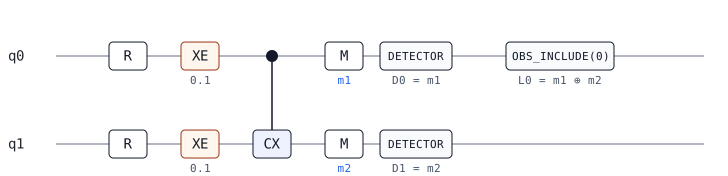
cat > circuit.stim <<'STIM'
R 0 1
X_ERROR(0.1) 0
X_ERROR(0.1) 1
CX 0 1
M 0 1
DETECTOR rec[-2]
DETECTOR rec[-1]
OBSERVABLE_INCLUDE(0) rec[-2] rec[-1]
STIM
rstim render_svg --in circuit.stim --out circuit.svg
rstim export_json --in circuit.stim --out circuit.qp101.jsoncircuit.svg shows the two-qubit circuit; circuit.qp101.json is its ordered circuit document.
Read the diagram
R resets a qubit; XE marks a possible X error, and the filled dot is the CNOT control. M marks a measurement. D0 and D1 label detector checks; L0 labels the logical parity. This is the circuit definition, before sampling a shot.
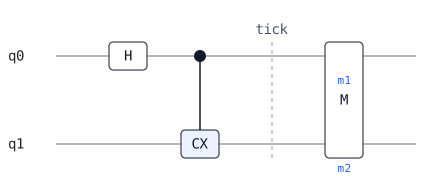
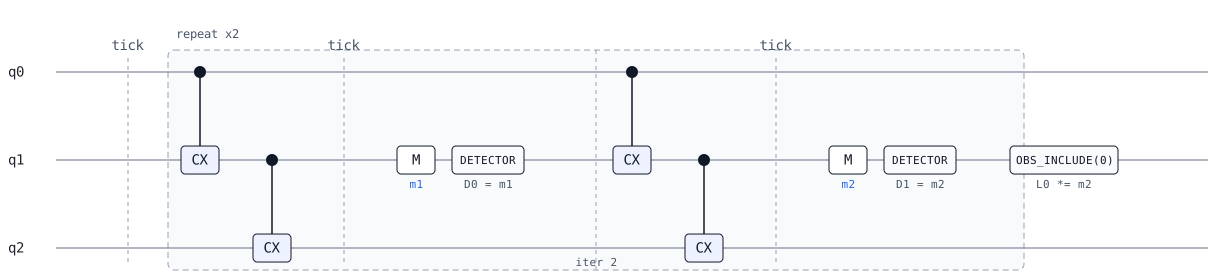
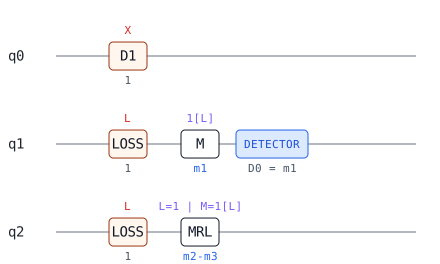
Rendered examples
Operation types
| Type | Purpose |
|---|---|
gate, noise | Quantum operations and faults |
repeat, tick | Structure and timing |
detector, observable_include | QEC annotations |
qubit_coords, shift_coords | Visualization coordinates |
Interactive schema browser
Loading schema
Fetching qp101.schema.json.